Rancher Server 设置
- Rancher 版本:
- 安装选项 (Docker install/Helm Chart):
- 如果是 Helm Chart 安装,需要提供 Local 集群的类型(RKE1, RKE2, k3s, EKS, 等)和版本:
- 在线或离线部署:
下游集群信息
- Kubernetes 版本:
- Cluster Type (Local/Downstream):
- 如果 Downstream,是什么类型的集群?(自定义/导入或为托管 等):
用户信息
- 登录用户的角色是什么? (管理员/集群所有者/集群成员/项目所有者/项目成员/自定义):
- 如果自定义,自定义权限集:
主机操作系统: RockyLinux9.7
问题描述: docker compose 跑的rancher 2.13.1 ,在主机重启后容器不能正常启动,
重现步骤: 好好的,直接重启部署rancher的主机
结果: 启动不了
预期结果:
截图:

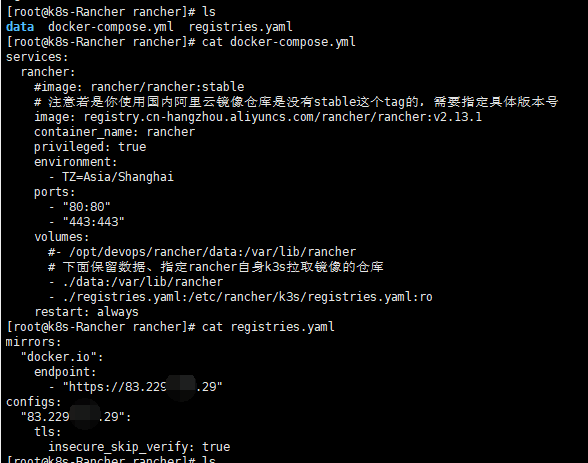
其他上下文信息:
日志
rancher  | 2026/01/20 15:14:33 [INFO] Successfully installed useractivity store
rancher  | 2026/01/20 15:14:33 [INFO] Successfully installed token store
rancher  | 2026/01/20 15:14:33 [INFO] Successfully installed kubeconfig store
rancher  | 2026/01/20 15:14:33 [INFO] Successfully installed passwordchangerequest store
rancher  | 2026/01/20 15:14:33 [INFO] Successfully installed groupmembershiprefreshrequest store
rancher  | 2026/01/20 15:14:33 [INFO] Successfully installed selfuser store
rancher  | I0120 15:14:33.723226     153 handler.go:285] Adding GroupVersion ext.cattle.io v1 to ResourceManager
rancher  | I0120 15:14:35.532002     153 requestheader_controller.go:180] Starting RequestHeaderAuthRequestController
rancher  | I0120 15:14:35.532035     153 configmap_cafile_content.go:205] "Starting controller" name="client-ca::kube-system::extension-apiserver-authentication::requestheader-client-ca-file"
rancher  | I0120 15:14:35.532043     153 shared_informer.go:349] "Waiting for caches to sync" controller="RequestHeaderAuthRequestController"
rancher  | I0120 15:14:35.532057     153 shared_informer.go:349] "Waiting for caches to sync" controller="client-ca::kube-system::extension-apiserver-authentication::requestheader-client-ca-file"
rancher  | I0120 15:14:35.532280     153 secure_serving.go:211] Serving securely on [::]:6666
rancher  | I0120 15:14:35.532365     153 tlsconfig.go:243] "Starting DynamicServingCertificateController"
rancher  | 2026/01/20 15:14:35 [FATAL] Internal error occurred: failed calling webhook "rancher.cattle.io.namespaces.create-non-kubesystem": failed to call webhook: Post "https://rancher-webhook.cattle-system.svc:443/v1/webhook/validation/namespaces?timeout=10s": no endpoints available for service "rancher-webhook"
rancher  | Restoring git repositories:
rancher  | - /var/lib/rancher-data/local-catalogs/v2/rancher-charts/4b40cac650031b74776e87c1a726b0484d0877c3ec137da0872547ff9b73a721/.git
rancher  | Your branch is up to date with 'origin/release-v2.13'.
rancher  | /var/lib/rancher
rancher  | - /var/lib/rancher-data/local-catalogs/v2/rancher-rke2-charts/675f1b63a0a83905972dcab2794479ed599a6f41b86cd6193d69472d0fa889c9/.git
rancher  | Your branch is up to date with 'origin/main'.
rancher  | /var/lib/rancher
rancher  | - /var/lib/rancher-data/local-catalogs/v2/rancher-partner-charts/8f17acdce9bffd6e05a58a3798840e408c4ea71783381ecd2e9af30baad65974/.git
rancher  | Your branch is up to date with 'origin/main'.
rancher  | /var/lib/rancher
rancher  | INFO: Running k3s server --cluster-init --cluster-reset
rancher  | 2026/01/20 15:14:49 [INFO] Rancher version v2.13.1 (4c2e04b310799e106c48d7e36f544f5e33b22f0a) is starting
rancher  | 2026/01/20 15:14:49 [INFO] Rancher arguments {ACMEDomains:[] AddLocal:true Embedded:false BindHost: HTTPListenPort:80 HTTPSListenPort:443 K8sMode:auto Debug:false Trace:false NoCACerts:false AuditLogPath:/var/log/auditlog/rancher-api-audit.log AuditLogMaxage:10 AuditLogMaxsize:100 AuditLogMaxbackup:10 AuditLogLevel:0 AuditLogEnabled:false Features: ClusterRegistry: AggregationRegistrationTimeout:5m0s}
rancher  | 2026/01/20 15:14:49 [INFO] Listening on /tmp/log.sock
rancher  | 2026/01/20 15:14:49 [INFO] Waiting for server to become available: Get "https://127.0.0.1:6444/version?timeout=15m0s": dial tcp 127.0.0.1:6444: connect: connection refused
rancher  | 2026/01/20 15:14:51 [INFO] Waiting for server to become available: Get "https://127.0.0.1:6444/version?timeout=15m0s": dial tcp 127.0.0.1:6444: connect: connection refused
rancher  | 2026/01/20 15:14:53 [INFO] Waiting for server to become available: Get "https://127.0.0.1:6444/version?timeout=15m0s": dial tcp 127.0.0.1:6444: connect: connection refused
rancher  | 2026/01/20 15:14:55 [INFO] Waiting for server to become available: Get "https://127.0.0.1:6444/version?timeout=15m0s": dial tcp 127.0.0.1:6444: connect: connection refused
rancher  | 2026/01/20 15:14:57 [INFO] Waiting for server to become available: Get "https://127.0.0.1:6444/version?timeout=15m0s": dial tcp 127.0.0.1:6444: connect: connection refused
rancher  | 2026/01/20 15:14:59 [INFO] Waiting for server to become available: Get "https://127.0.0.1:6444/version?timeout=15m0s": dial tcp 127.0.0.1:6444: connect: connection refused
rancher  | 2026/01/20 15:15:01 [INFO] Waiting for server to become available: Get "https://127.0.0.1:6444/version?timeout=15m0s": dial tcp 127.0.0.1:6444: connect: connection refused
rancher  | 2026/01/20 15:15:03 [INFO] Waiting for server to become available: Get "https://127.0.0.1:6444/version?timeout=15m0s": dial tcp 127.0.0.1:6444: connect: connection refused
rancher  | 2026/01/20 15:15:05 [INFO] Waiting for server to become available: Get "https://127.0.0.1:6444/version?timeout=15m0s": dial tcp 127.0.0.1:6444: connect: connection refused
rancher  | 2026/01/20 15:15:07 [INFO] Waiting for server to become available: Get "https://127.0.0.1:6444/version?timeout=15m0s": dial tcp 127.0.0.1:6444: connect: connection refused