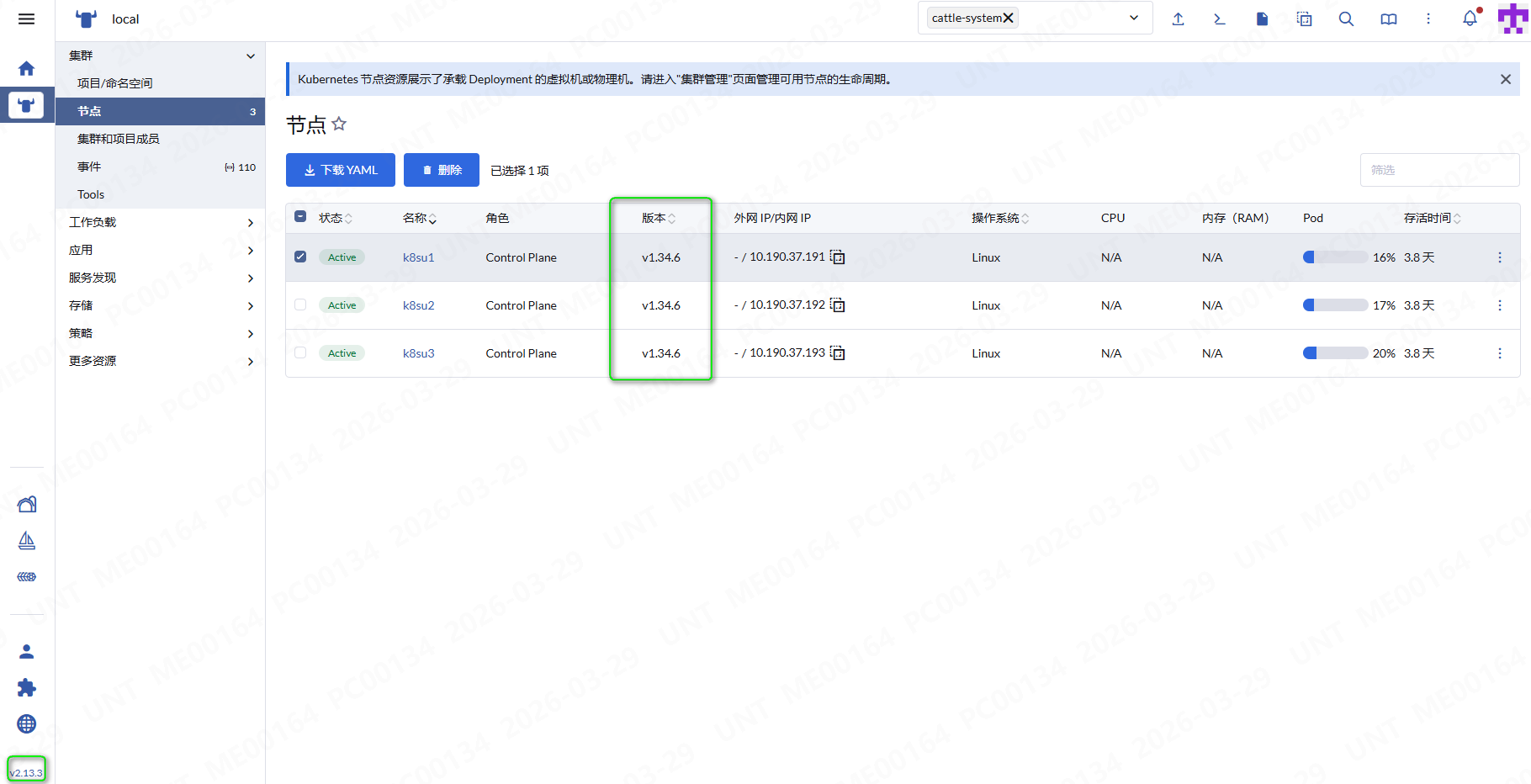
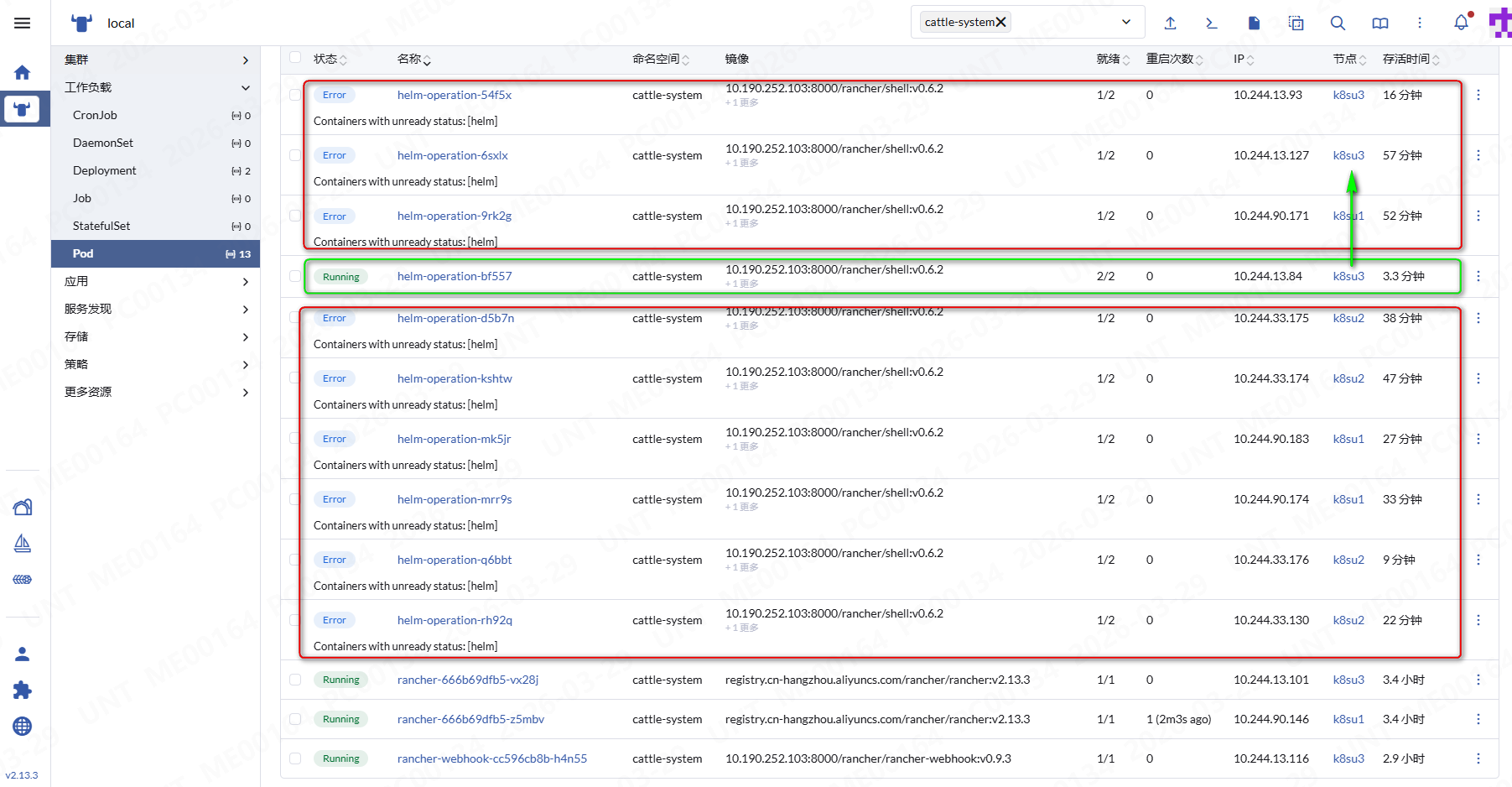
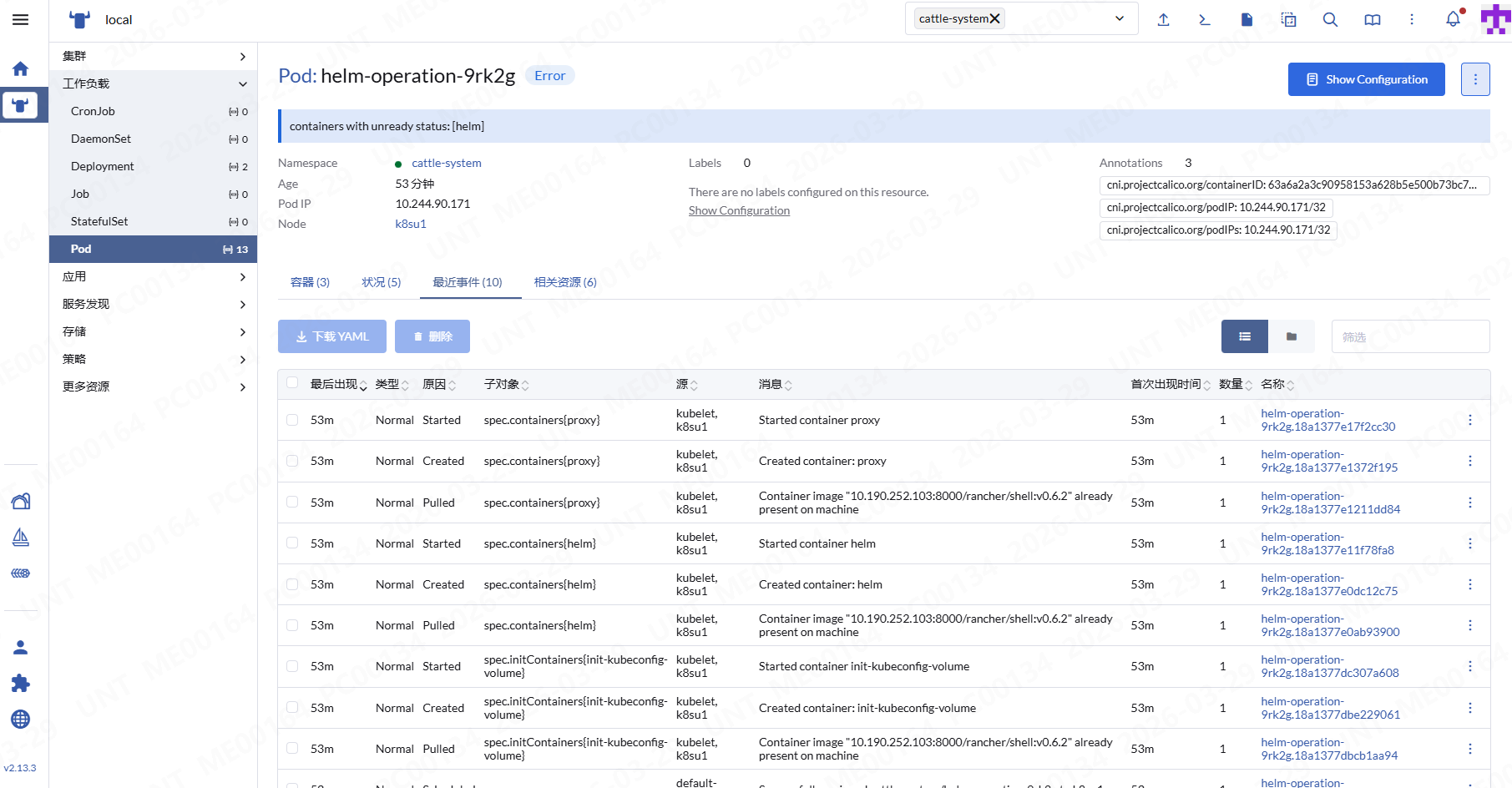
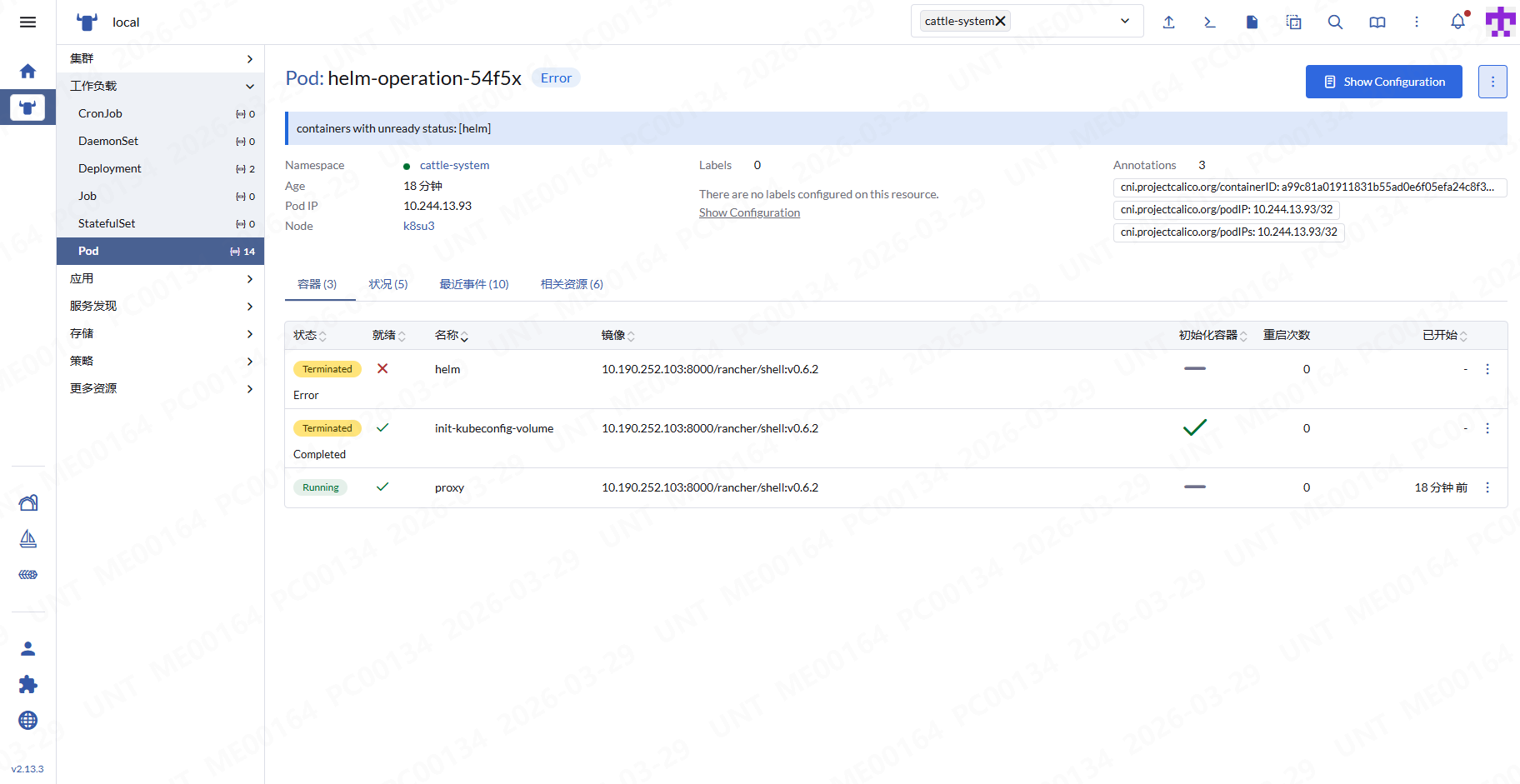
Helm部署Rancher 2.13.3 ,如图:Pod: helm-operation-54f5x Error ,这个是什么问题?image本地仓库有的。
Rancher Server 设置
- Rancher 版本:2.13.3
- 安装选项 (Helm Chart):
- 如果是 Helm Chart 安装,需要提供 Local 集群的类型(RKE1, RKE2, k3s, EKS, 等)和版本: v1.34.6
- 在线或离线部署:在线部署
Helm部署Rancher 2.13.3 ,如图:Pod: helm-operation-54f5x Error ,这个是什么问题?image本地仓库有的。
Rancher Server 设置
pod describe信息:
[root@k8su1:~/app]# kubectl get pods -n cattle-system
NAME                              READY   STATUS    RESTARTS      AGE
helm-operation-89wfp              1/2     Error     0             26m
helm-operation-8lrjr              1/2     Error     0             37m
helm-operation-8qwr6              1/2     Error     0             14m
helm-operation-jbwf2              2/2     Running   0             111s
helm-operation-jggnr              1/2     Error     0             20m
helm-operation-pp7g2              1/2     Error     0             32m
helm-operation-qs8tp              1/2     Error     0             56m
helm-operation-tsfnk              1/2     Error     0             44m
helm-operation-xfgdk              1/2     Error     0             50m
helm-operation-xgm49              1/2     Error     0             9m16s
rancher-666b69dfb5-vx28j          1/1     Running   0             29h
rancher-666b69dfb5-z5mbv          1/1     Running   1 (29h ago)   29h
rancher-webhook-cc596cb8b-h4n55   1/1     Running   0             29h
[root@k8su1:~/app]# kubectl describe pod helm-operation-89wfp -n cattle-system
Name:             helm-operation-89wfp
Namespace:        cattle-system
Priority:         0
Service Account:  default
Node:             k8su3/10.190.37.193
Start Time:       Mon, 30 Mar 2026 15:56:12 +0800
Labels:           pod-impersonation.cattle.io/token=ttljms7lvb6tzfd7w55w5xspzpf2fwr58bd4j7ffpfds8pbjlrmkz2
Annotations:      cni.projectcalico.org/containerID: fcd8d5beff4a687ff9a712dd0f5ce6910505b1b9bf6d9d057b8b6d1b9ee5e41d
                  cni.projectcalico.org/podIP: 10.244.13.85/32
                  cni.projectcalico.org/podIPs: 10.244.13.85/32
                  pod-impersonation.cattle.io/cluster-role: pod-impersonation-helm-op-zgwgl
Status:           Running
IP:               10.244.13.85
IPs:
  IP:  10.244.13.85
Init Containers:
  init-kubeconfig-volume:
    Container ID:  containerd://fc281c50c3205928ec74d99a25d23e339e5024f1ef8cb092a5df794a7caf44b9
    Image:         10.190.252.103:8000/rancher/shell:v0.6.2
    Image ID:      10.190.252.103:8000/rancher/shell@sha256:224b766c999a10f7ff35847185c34eec027e6eb9720b8bacdde002b44ca1a75f
    Port:          <none>
    Host Port:     <none>
    Command:
      sh
      -c
      cp /home/.kube/config /tmp/.kube/config
    State:          Terminated
      Reason:       Completed
      Exit Code:    0
      Started:      Mon, 30 Mar 2026 15:56:13 +0800
      Finished:     Mon, 30 Mar 2026 15:56:13 +0800
    Ready:          True
    Restart Count:  0
    Environment:    <none>
    Mounts:
      /home/.kube/config from user-kube-configmap (rw,path="config")
      /tmp/.kube from user-kubeconfig (rw)
Containers:
  helm:
    Container ID:  containerd://4c8eebe450078b2e828591a99518ffc2d62438a22918d692c4af31136d75c969
    Image:         10.190.252.103:8000/rancher/shell:v0.6.2
    Image ID:      10.190.252.103:8000/rancher/shell@sha256:224b766c999a10f7ff35847185c34eec027e6eb9720b8bacdde002b44ca1a75f
    Port:          <none>
    Host Port:     <none>
    Command:
      helm-cmd
    State:          Terminated
      Reason:       Error
      Exit Code:    123
      Started:      Mon, 30 Mar 2026 15:56:15 +0800
      Finished:     Mon, 30 Mar 2026 16:01:21 +0800
    Ready:          False
    Restart Count:  0
    Environment:
      KUBECONFIG:  /home/shell/.kube/config
    Mounts:
      /home/shell/.kube/config from user-kubeconfig (rw,path="config")
      /home/shell/helm from data (ro)
      /run from run (rw)
      /tmp from tmp (rw)
  proxy:
    Container ID:  containerd://dfd5986c1dfac354aa5a2ecb93ab677da9fc9039790a3b3f975f9ac3b1e45aca
    Image:         10.190.252.103:8000/rancher/shell:v0.6.2
    Image ID:      10.190.252.103:8000/rancher/shell@sha256:224b766c999a10f7ff35847185c34eec027e6eb9720b8bacdde002b44ca1a75f
    Port:          <none>
    Host Port:     <none>
    Command:
      sh
      -c
      kubectl proxy --disable-filter || true
    State:          Running
      Started:      Mon, 30 Mar 2026 15:56:15 +0800
    Ready:          True
    Restart Count:  0
    Environment:
      KUBECONFIG:  /home/shell/.kube/config
    Mounts:
      /home/shell/.kube/config from admin-kubeconfig (ro,path="config")
      /var/run/secrets/kubernetes.io/serviceaccount from pod-impersonation-helm-op-kmr8c-token (ro)
Conditions:
  Type                        Status
  PodReadyToStartContainers   True
  Initialized                 True
  Ready                       False
  ContainersReady             False
  PodScheduled                True
Volumes:
  tmp:
    Type:       EmptyDir (a temporary directory that shares a pod's lifetime)
    Medium:
    SizeLimit:  <unset>
  run:
    Type:       EmptyDir (a temporary directory that shares a pod's lifetime)
    Medium:
    SizeLimit:  <unset>
  data:
    Type:        Secret (a volume populated by a Secret)
    SecretName:  helm-operation-57c8q
    Optional:    false
  admin-kubeconfig:
    Type:      ConfigMap (a volume populated by a ConfigMap)
    Name:      impersonation-helm-op-admin-kubeconfig-rrg5x
    Optional:  false
  user-kubeconfig:
    Type:       EmptyDir (a temporary directory that shares a pod's lifetime)
    Medium:
    SizeLimit:  <unset>
  user-kube-configmap:
    Type:      ConfigMap (a volume populated by a ConfigMap)
    Name:      impersonation-helm-op-user-kubeconfig-7bvjs
    Optional:  false
  pod-impersonation-helm-op-kmr8c-token:
    Type:        Secret (a volume populated by a Secret)
    SecretName:  pod-impersonation-helm-op-kmr8c-token
    Optional:    false
QoS Class:       BestEffort
Node-Selectors:  kubernetes.io/os=linux
Tolerations:     cattle.io/os=linux:NoSchedule
                 node-role.kubernetes.io/control-plane:NoSchedule op=Exists
                 node-role.kubernetes.io/controlplane=true:NoSchedule
                 node-role.kubernetes.io/etcd:NoExecute op=Exists
                 node.cloudprovider.kubernetes.io/uninitialized=true:NoSchedule
                 node.kubernetes.io/not-ready:NoExecute op=Exists for 300s
                 node.kubernetes.io/unreachable:NoExecute op=Exists for 300s
Events:
  Type    Reason     Age   From               Message
  ----    ------     ----  ----               -------
  Normal  Scheduled  26m   default-scheduler  Successfully assigned cattle-system/helm-operation-89wfp to k8su3
  Normal  Pulled     26m   kubelet            Container image "10.190.252.103:8000/rancher/shell:v0.6.2" already present on machine
  Normal  Created    26m   kubelet            Created container: init-kubeconfig-volume
  Normal  Started    26m   kubelet            Started container init-kubeconfig-volume
  Normal  Pulled     26m   kubelet            Container image "10.190.252.103:8000/rancher/shell:v0.6.2" already present on machine
  Normal  Created    26m   kubelet            Created container: helm
  Normal  Started    26m   kubelet            Started container helm
  Normal  Pulled     26m   kubelet            Container image "10.190.252.103:8000/rancher/shell:v0.6.2" already present on machine
  Normal  Created    26m   kubelet            Created container: proxy
  Normal  Started    26m   kubelet            Started container proxy
describe 的内容是没问题的,正常拉取了镜像,也正常启动了 pod,接下来就得排查 pod 的 log 了,看看为什么启动失败
失败的pod日志如下:
[root@k8su1:~/app]# kubectl logs  helm-operation-89wfp -n cattle-system -c helm
helm upgrade --history-max=5 --install=true --labels=catalog.cattle.io/cluster-repo-name=rancher-charts --namespace=cattle-turtles-system --reset-values=true --take-ownership=true --timeout=5m0s --values=/home/shell/helm/values-rancher-turtles-108.0.4-up0.25.4.yaml --version=108.0.4+up0.25.4 --wait=true rancher-turtles /home/shell/helm/rancher-turtles-108.0.4-up0.25.4.tgz
Error: UPGRADE FAILED: pre-upgrade hooks failed: 1 error occurred:
	* timed out waiting for the condition
感谢@KSD 龙哥的支持,过滤了cattle-system命名空间,没有注意cattle-turtles-system空间下有2个pod没有拉到镜像:
> k -n cattle-system logs  helm-operation-5sfxb
Defaulted container "helm" out of: helm, proxy, init-kubeconfig-volume (init)
helm upgrade --history-max=5 --install=true --labels=catalog.cattle.io/cluster-repo-name=rancher-charts --namespace=cattle-turtles-system --reset-values=true --take-ownership=true --timeout=5m0s --values=/home/shell/helm/values-rancher-turtles-108.0.4-up0.25.4.yaml --version=108.0.4+up0.25.4 --wait=true rancher-turtles /home/shell/helm/rancher-turtles-108.0.4-up0.25.4.tgz
Error: UPGRADE FAILED: pre-upgrade hooks failed: 1 error occurred:
        * timed out waiting for the condition
> kubectl -n cattle-turtles-system get pods
NAME                                                  READY   STATUS             RESTARTS   AGE
rancher-clusterctl-configmap-cleanup-j9msp            0/1     ImagePullBackOff   0          3m44s
rancher-turtles-controller-manager-7748f6f88d-6j7h6   0/1     ImagePullBackOff   0          30h
> kubectl -n cattle-turtles-system describe pods  rancher-turtles-controller-manager-7748f6f88d-6j7h6
Name:             rancher-turtles-controller-manager-7748f6f88d-6j7h6
Namespace:        cattle-turtles-system
Priority:         0
Service Account:  rancher-turtles-manager
Node:             k8su3/10.190.37.193
Start Time:       Sun, 29 Mar 2026 02:32:56 +0000
Labels:           control-plane=controller-manager
                  pod-template-hash=7748f6f88d
Annotations:      cni.projectcalico.org/containerID: 4b786e10f8fd466de5687d3d952fdcc95b63351736c55787302e2d7aa67a13c3
                  cni.projectcalico.org/podIP: 10.244.13.105/32
                  cni.projectcalico.org/podIPs: 10.244.13.105/32
                  kubectl.kubernetes.io/default-container: manager
Status:           Pending
IP:               10.244.13.105
IPs:
  IP:           10.244.13.105
Controlled By:  ReplicaSet/rancher-turtles-controller-manager-7748f6f88d
Containers:
  manager:
    Container ID:
    Image:           10.190.252.103:8000/rancher/turtles:v0.25.4
    Image ID:
    Port:            <none>
    Host Port:       <none>
    SeccompProfile:  RuntimeDefault
    Command:
      /manager
    Args:
      --leader-elect
      --feature-gates=agent-tls-mode=true,no-cert-manager=true,use-rancher-default-registry=true
    State:          Waiting
      Reason:       ImagePullBackOff
    Ready:          False
    Restart Count:  0
    Limits:
      cpu:     500m
      memory:  300Mi
    Requests:
      cpu:      10m
      memory:   128Mi
    Liveness:   http-get http://:9440/healthz delay=15s timeout=1s period=20s #success=1 #failure=3
    Readiness:  http-get http://:9440/readyz delay=5s timeout=1s period=10s #success=1 #failure=3
    Environment:
      POD_NAMESPACE:  cattle-turtles-system (v1:metadata.namespace)
      POD_NAME:       rancher-turtles-controller-manager-7748f6f88d-6j7h6 (v1:metadata.name)
      POD_UID:         (v1:metadata.uid)
    Mounts:
      /config from clusterctl-config (rw)
      /var/run/secrets/kubernetes.io/serviceaccount from kube-api-access-tdlkn (ro)
Conditions:
  Type                        Status
  PodReadyToStartContainers   True
  Initialized                 True
  Ready                       False
  ContainersReady             False
  PodScheduled                True
Volumes:
  clusterctl-config:
    Type:      ConfigMap (a volume populated by a ConfigMap)
    Name:      clusterctl-config
    Optional:  false
  kube-api-access-tdlkn:
    Type:                    Projected (a volume that contains injected data from multiple sources)
    TokenExpirationSeconds:  3607
    ConfigMapName:           kube-root-ca.crt
    Optional:                false
    DownwardAPI:             true
QoS Class:                   Burstable
Node-Selectors:              <none>
Tolerations:                 node-role.kubernetes.io/control-plane:NoSchedule
                             node-role.kubernetes.io/master:NoSchedule
                             node.kubernetes.io/not-ready:NoExecute op=Exists for 300s
                             node.kubernetes.io/unreachable:NoExecute op=Exists for 300s
Events:
  Type     Reason   Age                     From     Message
  ----     ------   ----                    ----     -------
  Normal   BackOff  4m49s (x8012 over 30h)  kubelet  Back-off pulling image "10.190.252.103:8000/rancher/turtles:v0.25.4"
  Warning  Failed   4m49s (x8012 over 30h)  kubelet  Error: ImagePullBackOff